
Infrastructure Overview
How your service cluster and production cluster are structured.
# Two-cluster model
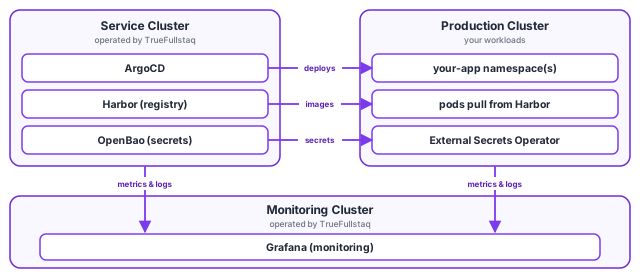
TrueFullstaq provisions two separate Kubernetes clusters for every customer:
| Cluster | Purpose | Managed by |
|---|---|---|
| Service cluster | Runs the shared platform tooling (ArgoCD, Harbor, OpenBao) you use to build and ship software | TrueFullstaq |
| Production cluster | Runs your own application workloads | You, with TrueFullstaq support |
The two clusters are deliberately separated so that the tools you depend on (your registry, your GitOps controller, your secrets backend) keep running independently of whatever you deploy on production, and so that a problem in your workloads can never take down the platform that operates them.
Throughout this documentation we use <CUSTOMER_ID> to mean your 5-digit customer ID
(for example 01234). Every service you reach has a hostname built from it.
# Your customer ID and hostnames
All of your services live under <CUSTOMER_ID>.truefullstaq.cloud. Using 01234 as an
example:
| Service | Hostname pattern | Example |
|---|---|---|
| Dashboard (CIK) | dash.<CUSTOMER_ID>.truefullstaq.cloud |
dash.01234.truefullstaq.cloud |
| ArgoCD | argocd.<CUSTOMER_ID>.truefullstaq.cloud |
argocd.01234.truefullstaq.cloud |
| Harbor (registry) | registry.<CUSTOMER_ID>.truefullstaq.cloud |
registry.01234.truefullstaq.cloud |
| OpenBao (secrets) | secrets.<CUSTOMER_ID>.truefullstaq.cloud |
secrets.01234.truefullstaq.cloud |
# The dashboard (CIK)
Your starting point is the Customer Interface (CIK) dashboard at
https://dash.<CUSTOMER_ID>.truefullstaq.cloud. From there you can:
- See all services provisioned for you, each with a direct link.
- Download the kubeconfig for your production cluster(s).
See Using kubectl for the kubeconfig workflow.
# Service cluster
The service cluster hosts the tooling that supports your production workloads:
- ArgoCD + Argo Workflows: GitOps continuous delivery. ArgoCD syncs manifests from your Git repositories to the production cluster. Argo Workflows runs CI/CD jobs (such as build pipelines) when you need them. See CI/CD with ArgoCD.
- Harbor: Your private container registry, with built-in CVE scanning. See Container Registry.
- OpenBao: Your secrets backend (an open-source Vault). Secrets live here, never in Git. See Secrets Management.
# Production cluster
This is where your applications run:
- You deploy here through ArgoCD (running on the service cluster) using the app-of-apps pattern; see CI/CD with ArgoCD.
- The External Secrets Operator runs here and pulls secrets from OpenBao on the service
cluster, materialising them as native Kubernetes
Secrets. See External Secrets Operator. - Networking is handled by Cilium (it is the CNI and also the Gateway API implementation). Traffic between workloads can be locked down with network policies; see Network Policies.
- Each production cluster has a name like
cid<CUSTOMER_ID>-cl02and a public Kubernetes API endpoint on port6443.
# How you access everything
| What | How |
|---|---|
| Web UIs (ArgoCD, Harbor, OpenBao) | Browser + Single Sign-On (TrueFullstaq SSO / Keycloak) |
kubectl against the production cluster |
A kubeconfig downloaded from the dashboard, which authenticates you via SSO |
| Pushing images | docker login to Harbor (user or robot account) |
You do not manage long-lived static credentials for cluster access; kubectl logs you
in through SSO on demand. See Access Control for the full
picture.