
External Secrets Operator
Pull secrets from OpenBao into your production cluster as native Kubernetes Secrets.
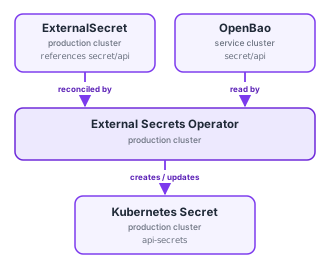
The External Secrets Operator (ESO) runs on your production cluster and bridges OpenBao
to Kubernetes. You declare which OpenBao path you want; ESO authenticates to OpenBao,
reads the value, and keeps a normal Kubernetes Secret in sync with it. Your pods consume
that Secret the usual way and never need to know OpenBao exists.
Why this is better than putting secrets in manifests:
- Nothing sensitive is ever committed to Git.
- Rotating in OpenBao automatically updates the cluster
Secret. - Access to OpenBao is via the cluster’s own Kubernetes identity, with no static tokens to distribute.
# The ClusterSecretStore (already set up)
ESO connects to OpenBao through a ClusterSecretStore named openbao-store. It is
provisioned for you; you reference it, you don’t create it. It is configured to:
- talk to your service cluster’s OpenBao (
https://secrets.<CUSTOMER_ID>.truefullstaq.cloud), - read the KV v2 engine at
secret/, - authenticate with the production cluster’s Kubernetes service account (role
eso-role).
Because it’s a ClusterSecretStore, you can reference it from any namespace.
# Confirm it's healthy (should read Valid / True)
kubectl get clustersecretstore openbao-store
kubectl describe clustersecretstore openbao-store
# Creating an ExternalSecret
An ExternalSecret lives in your app’s namespace and says “build this Kubernetes Secret
from that OpenBao path.” Given a secret written as:
bao kv put secret/api DB_PASSWORD='s3cr3t-pw' JWT_SIGNING_KEY='abc123'
# Pattern A: pull every key from a path
dataFrom copies all keys at the path into the resulting Secret as-is.
apiVersion: external-secrets.io/v1
kind: ExternalSecret
metadata:
  name: api-secrets
  namespace: api
spec:
  refreshInterval: 1m                 # how often ESO re-reads OpenBao
  secretStoreRef:
    name: openbao-store
    kind: ClusterSecretStore
  target:
    name: api-secrets                 # name of the Kubernetes Secret to create
    creationPolicy: Owner             # ESO owns it; deleting the ExternalSecret deletes it
  dataFrom:
    - extract:
        key: api                      # the OpenBao path under secret/ (i.e. secret/api)
Result: a Secret named api-secrets with keys DB_PASSWORD and JWT_SIGNING_KEY.
kubectl get externalsecret api-secrets -n api   # STATUS should be SecretSynced
kubectl get secret api-secrets -n api -o yaml
# Pattern B: pick and rename specific keys
Use data when you want only certain keys, or different key names in Kubernetes:
apiVersion: external-secrets.io/v1
kind: ExternalSecret
metadata:
  name: api-db
  namespace: api
spec:
  refreshInterval: 1m
  secretStoreRef:
    name: openbao-store
    kind: ClusterSecretStore
  target:
    name: api-db
    creationPolicy: Owner
  data:
    - secretKey: DATABASE_PASSWORD     # key name in the K8s Secret
      remoteRef:
        key: api                       # secret/api
        property: DB_PASSWORD          # which field at that path
# Pattern C: render a templated secret (e.g. a connection string)
target.template lets you assemble a value from multiple OpenBao fields, useful for DSNs,
.env files, or dockerconfig pull secrets:
apiVersion: external-secrets.io/v1
kind: ExternalSecret
metadata:
  name: api-dsn
  namespace: api
spec:
  refreshInterval: 1m
  secretStoreRef:
    name: openbao-store
    kind: ClusterSecretStore
  target:
    name: api-dsn
    creationPolicy: Owner
    template:
      engineVersion: v2
      data:
        DATABASE_URL: "postgres://api:{{ .password }}@db:5432/api"
  data:
    - secretKey: password
      remoteRef:
        key: api
        property: DB_PASSWORD
# Consuming the Secret in a pod
Once the Secret exists it’s plain Kubernetes. All keys as environment variables:
spec:
  containers:
    - name: api
      image: registry.01234.truefullstaq.cloud/my-project/api:v1.4.2
      envFrom:
        - secretRef:
            name: api-secrets
Or individual variables:
env:
  - name: DB_PASSWORD
    valueFrom:
      secretKeyRef:
        name: api-secrets
        key: DB_PASSWORD
Or mounted as files:
volumes:
  - name: secrets
    secret:
      secretName: api-secrets
# ...
volumeMounts:
  - name: secrets
    mountPath: /etc/secrets
    readOnly: true
# Deploy it the GitOps way
ExternalSecret manifests contain no secret material, only pointers, so they belong
in Git and deploy through ArgoCD like everything else. Drop them next to your app’s manifests
(see CI/CD with ArgoCD).
# When a secret changes
-
Update the value in OpenBao (
bao kv patch secret/api DB_PASSWORD=...). -
ESO refreshes the Kubernetes
SecretwithinrefreshInterval(~1 min above). -
Restart pods that read the secret at startup:
kubectl rollout restart deployment/api -n api
# Troubleshooting
# Why isn't my secret syncing? Check status conditions and events.
kubectl describe externalsecret <name> -n <namespace>

# Store-level problems (auth, connectivity) show here:
kubectl describe clustersecretstore openbao-store
| Status / message | Likely cause |
|---|---|
SecretSynced / Ready=True |
Working as intended. |
SecretSyncedError, key not found |
The OpenBao path or property doesn’t exist; check bao kv get secret/<path>. Remember the store is rooted at secret/, so key: api means secret/api. |
Store Invalid / auth errors |
Kubernetes auth to OpenBao isn’t working for this cluster; contact your TrueFullstaq engineer. |
| Secret not updating after a change | Wait for refreshInterval, then restart the consuming pods. |