
CI/CD with ArgoCD
Deploy your applications with ArgoCD using GitOps and the app-of-apps pattern.
ArgoCD is your GitOps continuous-delivery controller. It runs on the service cluster and
deploys your workloads onto the production cluster. Git is the source of truth: you push the manifests to git, ArgoCD reconciles the cluster to match that state. You do not kubectl apply your apps
by hand.

# Accessing ArgoCD
-
Web UI:
https://argocd.<CUSTOMER_ID>.truefullstaq.cloud. Click Log in via TrueFullstaq Identity to sign in with SSO. Your access is granted through the SSO group/customers/<CUSTOMER_ID>/k8s/admin. -
CLI:
# Install: https://argo-cd.readthedocs.io/en/stable/cli_installation/
argocd login argocd.<CUSTOMER_ID>.truefullstaq.cloud --sso
argocd app list
# The two projects you work with
ArgoCD groups Applications into AppProjects, which set guardrails on where an app may deploy and what it may create. Your environment ships with two:
| Project | Deploys to | Allowed to create | Use it for |
|---|---|---|---|
default |
the service cluster (https://kubernetes.default.svc) |
only Application / ApplicationSet resources |
your root app-of-apps |
project-customer |
your production cluster (https://<PRODUCTION_CLUSTER_IP>:6443) |
any Kubernetes resource, in any namespace | your actual workloads |
In other words: the default project can only spawn more ArgoCD Applications on the
service cluster; it cannot run a Pod there. Your real Deployments, Services, secrets, etc.
go through project-customer, which is wired to your production cluster. This separation is
what keeps your workloads off the platform cluster.
Finding your production cluster’s server URL: in the UI go to Settings → Clusters, or run
argocd cluster list. It looks likehttps://87.233.10.20:6443. Use that exact value as thedestination.serverin your Applications (you can also reference it by its registered name).
# The app-of-apps pattern
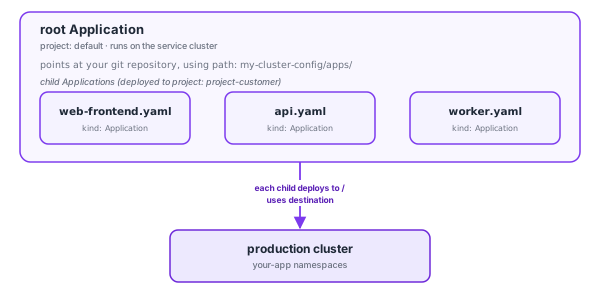
Rather than creating dozens of Applications by hand in the UI, you define one root Application that points at a directory of child Application manifests in Git. ArgoCD syncs the root, which creates the children, which deploy your workloads. Add a new app by committing a new child manifest, with no clicking required.
# Recommended Git layout
my-cluster-config/
├── apps/                      # one child Application per workload
│   ├── web-frontend.yaml
│   ├── api.yaml
│   └── worker.yaml
└── manifests/                 # the actual Kubernetes manifests
    ├── web-frontend/
    │   ├── deployment.yaml
    │   ├── service.yaml
    │   ├── httproute.yaml
    │   └── kustomization.yaml
    ├── api/
    │   └── ...
    └── worker/
        └── ...
# Step 1: Create the root Application
Create this once in the UI (+ New App → Edit as YAML, paste, Create) or with
kubectl/argocd app create. It belongs to the default project and its destination is
the service cluster, because all it does is create child Applications there.
apiVersion: argoproj.io/v1alpha1
kind: Application
metadata:
  name: root
  namespace: argo                       # ArgoCD's namespace on the service cluster
spec:
  project: default                      # root app => default project
  source:
    repoURL: https://github.com/your-org/my-cluster-config.git
    targetRevision: main
    path: apps                          # the folder full of child Applications
  destination:
    server: https://kubernetes.default.svc   # the service cluster (where ArgoCD runs)
    namespace: argo
  syncPolicy:
    automated:                          # auto-create children as you add them
      prune: true                       # delete children when you remove their file
      selfHeal: true
# Step 2: Add a child Application per workload
Each file in apps/ is an Application in the project-customer project, with its
destination set to your production cluster. Example apps/api.yaml:
apiVersion: argoproj.io/v1alpha1
kind: Application
metadata:
  name: api
  namespace: argo
spec:
  project: project-customer             # workloads => project-customer
  source:
    repoURL: https://github.com/your-org/my-cluster-config.git
    targetRevision: main
    path: manifests/api                 # plain manifests or a kustomization
  destination:
    # your production cluster, NOT kubernetes.default.svc
    server: https://87.233.10.20:6443
    namespace: api                      # target namespace on production (auto-created below)
  syncPolicy:
    automated:
      prune: true
      selfHeal: true
    syncOptions:
      - CreateNamespace=true            # create the 'api' namespace if it doesn't exist
Key fields, and why they matter here:
project: project-customer: required for anything that deploys to production.project-customeronly permits the production cluster as a destination, so an app with the wrong destination will be rejected.destination.server: the production cluster API (https://<IP>:6443), or the cluster’s registered name viadestination.name. Usingkubernetes.default.svchere would aim at the service cluster and be blocked by the project.destination.namespace: the namespace your workload lands in on production. Combine withCreateNamespace=trueso you don’t have to pre-create it.
# Step 3: Commit and watch it roll out
git add apps/api.yaml manifests/api/
git commit -m "Add api service"
git push
The root app picks up the new file, creates the api child Application, and that child
deploys to your production cluster, typically within seconds.
# Deploying a new version of an app
The day-to-day loop once an app exists:
- Build and push your image to Harbor. See Container Registry.
- Bump the image tag in
manifests/api/deployment.yaml(or let your pipeline do it). git commit && git push.- ArgoCD detects the change and syncs.
# manifests/api/deployment.yaml (excerpt)
containers:
  - name: api
    image: registry.01234.truefullstaq.cloud/my-project/api:v1.4.2   # ← bump this
# Inspecting and operating apps
# List all apps and their health/sync state
argocd app list

# Detail for one app (shows the diff if OutOfSync)
argocd app get api

# Force a sync now instead of waiting for auto-sync
argocd app sync api

# Show the live-vs-desired diff
argocd app diff api

# Watch resources come up
argocd app wait api --health
A healthy app reads Synced and Healthy. If you see:
OutOfSync: Git and the cluster differ; sync (or wait for auto-sync) to converge.Degraded: the workload is unhealthy (failing probes, crash loop). Checkkubectl describe/logs; see Using kubectl.Unknown/ comparison error: often a bad destination or a resource the project does not allow; check the app’s Conditions in the UI.
# Rolling back
GitOps rollback = revert the commit:
git revert <bad-commit> && git push
Or roll back the running app to a previous synced revision directly:
-
UI: open the app → History and Rollback → pick a revision → Rollback.
-
CLI:
argocd app history api
argocd app rollback api <revision-id>
Note: if the app has
selfHeal: true, ArgoCD will pull it back toward Git. For a durable rollback, change Git (thegit revertroute).
# CI: building images with Argo Workflows
Alongside ArgoCD, Argo Workflows is available on the service cluster for running CI jobs (for example, building and pushing an image to Harbor before the GitOps deploy). If you want a build pipeline wired up, ask your TrueFullstaq engineer. The typical shape is: a Workflow builds the image, pushes it to Harbor with a robot account (see Container Registry), and updates the image tag in your Git repo, which ArgoCD then deploys.
# Common questions
Can I deploy to the service cluster? No, that’s reserved for the platform. The
default project only lets you create Applications, and project-customer only targets your
production cluster. This is by design.
Can I deploy a Helm chart hosted in Harbor? Yes. Harbor serves charts as OCI
artifacts, so register the repo as type helm with Enable OCI on and reference it
without the oci:// prefix. See Hosting Helm charts (OCI)
on the Harbor page.
Where do my Application objects live? On the service cluster, in the argo namespace,
next to ArgoCD. Their destinations are what point at production.
Do I need to register my production cluster? No, it’s already registered. Find its
server URL under Settings → Clusters or via argocd cluster list.