
Exposing Apps (Gateway API)
Create a Gateway and HTTPRoutes on your production cluster to expose your apps to the internet.
To reach your applications from the internet you use the Gateway API — the successor to
the classic Ingress resource. It splits the configuration into a few small, focused
pieces: a Gateway that owns the public entrypoint and TLS, and one or more HTTPRoutes
that map incoming requests to your Services.
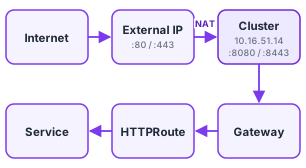
On your production cluster, TrueFullstaq gives you the pieces to do this, but you
create the Gateway yourself — we do not provision one for you.
| Provided by TrueFullstaq | Created by you |
|---|---|
| Cilium (the CNI, and the Gateway API implementation) | A Gateway resource |
The Gateway API CRDs (gateway.networking.k8s.io) |
HTTPRoutes that attach to your Gateway |
The cilium GatewayClass |
A Certificate for HTTPS (cert-manager issues it) |
| cert-manager, for automatic TLS certificates | DNS records pointing at your public IP |
| A LoadBalancer IP + the public IP in front of it |
This is different from the platform services on your service cluster (ArgoCD, Harbor, OpenBao): those sit behind a Gateway that we manage. On your production cluster, the Gateway is yours to create and own.
Throughout this page, replace <CUSTOMER_ID> with your 5-digit ID (e.g. 01234) and
<PUBLIC_IP> with your cluster’s public IP (see below).
# What’s already in place
You don’t install anything — Cilium, the Gateway API CRDs, and cert-manager all ship with your cluster. Confirm they are ready:
# The GatewayClass you will reference. Should report ACCEPTED=True.
kubectl get gatewayclass cilium

# The Gateway API CRDs we supply are present:
kubectl get crd | grep gateway.networking.k8s.io
# gatewayclasses.gateway.networking.k8s.io
# gateways.gateway.networking.k8s.io
# httproutes.gateway.networking.k8s.io
# ...

# cert-manager is running:
kubectl get pods -n cert-manager
# How traffic reaches your cluster
We deploy a managed CiliumLoadBalancerIPPool for you, and Cilium assigns your Gateway a
LoadBalancer IP from it and announces it on the network. Traffic to your cluster’s public
IP is NAT-ted to that internal address. There’s one important detail in that NAT:
- Traffic to port 80 is forwarded to 8080.
- Traffic to port 443 is forwarded to 8443.
So your Gateway must listen on 8080 and 8443, not 80 and 443 — a listener on 80 or
443 will never receive traffic. The outside world still connects on the standard 80/443
ports; the rewrite happens during NAT. You point DNS at the public IP — you don’t pick the
internal LoadBalancer IP yourself.
# Step 1: Find your public IP
Your cluster’s public IP is shown in the CIK dashboard at
https://dash.<CUSTOMER_ID>.truefullstaq.cloud — it is the address in your production
cluster’s Kubernetes API endpoint (https://<PUBLIC_IP>:6443), which you can also read off
the kubeconfig you download there. The same public IP serves your apps over 80/443,
so this is the address all your application DNS records should point to.
# Step 2: Create the Gateway
The Gateway defines the public entrypoint: which hostnames it answers for, which ports it
listens on, and how TLS is terminated. Create one Gateway and give it a listener per
hostname you serve. Because a cluster has a single public IP, routing is by hostname, so
prefer one shared Gateway with multiple listeners over many Gateways.
apiVersion: gateway.networking.k8s.io/v1
kind: Gateway
metadata:
  name: app-gateway
  namespace: my-namespace
spec:
  gatewayClassName: cilium          # the class we provide
  listeners:
    # HTTPS — terminates TLS using the Secret cert-manager will create in step 4
    - name: my-app-https
      hostname: "my-app.example.com"
      port: 8443                     # public 443 is translated to 8443
      protocol: HTTPS
      tls:
        mode: Terminate
        certificateRefs:
          - kind: Secret
            name: my-app-tls
      allowedRoutes:
        namespaces:
          from: Same                 # only HTTPRoutes in this namespace may attach
    # HTTP — serves redirects and lets cert-manager's HTTP-01 challenge through
    - name: my-app-http
      hostname: "my-app.example.com"
      port: 8080                     # public 80 is translated to 8080
      protocol: HTTP
      allowedRoutes:
        namespaces:
          from: Same
allowedRoutes.namespaces.from controls which namespaces may attach routes: use Same to
keep routes in the Gateway’s own namespace, or All if your application lives in a
different namespace from the Gateway (or you share one Gateway across teams).
Check it was accepted and note the assigned address:
kubectl get gateway app-gateway -n my-namespace
# NAME          CLASS    ADDRESS        PROGRAMMED   AGE
# app-gateway   cilium   10.x.x.x       True         30s
The HTTPS listener stays degraded until its Secret exists — that’s expected; cert-manager
fills it in at step 4. The HTTP listener is Programmed immediately, which is what the
certificate challenge needs.
# Step 3: Point DNS at your public IP
Create a DNS A record for each hostname, pointing at your public IP from step 1:
my-app.example.com. A <PUBLIC_IP>
This must be in place before the next step: cert-manager validates the certificate over
HTTP, so Let’s Encrypt has to be able to reach http://my-app.example.com at your public IP.
# Step 4: Request a TLS certificate with cert-manager
The HTTPS listener above references a Secret named my-app-tls. You don’t create that
Secret by hand — cert-manager generates it from a Certificate resource. cert-manager
is installed on every cluster, but TrueFullstaq does not provide a shared issuer, so you
create your own first.
cert-manager solves the Let’s Encrypt HTTP-01 challenge through the HTTP listener on your Gateway, so the issuer must point at your Gateway:
apiVersion: cert-manager.io/v1
kind: Issuer
metadata:
  name: letsencrypt
  namespace: my-namespace
spec:
  acme:
    server: https://acme-v02.api.letsencrypt.org/directory
    email: you@example.com               # your contact address
    privateKeySecretRef:
      name: letsencrypt-account
    solvers:
      - http01:
          gatewayHTTPRoute:
            parentRefs:
              - name: app-gateway          # your Gateway from step 2
                namespace: my-namespace
                kind: Gateway
Then request the certificate. cert-manager writes the result into the my-app-tls Secret
that your HTTPS listener already references:
apiVersion: cert-manager.io/v1
kind: Certificate
metadata:
  name: my-app-tls
  namespace: my-namespace                 # must be the same namespace as the Gateway
spec:
  secretName: my-app-tls                  # matches certificateRefs in the Gateway
  issuerRef:
    name: letsencrypt
    kind: Issuer
  dnsNames:
    - my-app.example.com
Watch it go Ready:
kubectl get certificate my-app-tls -n my-namespace -w
# NAME         READY   SECRET       AGE
# my-app-tls   True    my-app-tls   90s
Once the Secret exists, the Gateway’s HTTPS listener becomes Programmed automatically.
The
Certificate(and its Secret) must live in the same namespace as the Gateway, because that’s where the Gateway looks for it. You can scope the issuer to one namespace with anIssuer(as here) or make it cluster-wide with aClusterIssuer. While testing, pointserverat the Let’s Encrypt staging endpoint (https://acme-staging-v02.api.letsencrypt.org/directory) to avoid hitting rate limits.
# Step 5: Attach an HTTPRoute
A Gateway listener does nothing until an HTTPRoute sends traffic to one of your Services.
The route can live in a different namespace from the Gateway if the listener allows it
(allowedRoutes.namespaces.from: All).
apiVersion: gateway.networking.k8s.io/v1
kind: HTTPRoute
metadata:
  name: my-app
  namespace: my-namespace
spec:
  parentRefs:
    - name: app-gateway             # your Gateway from step 2
      namespace: my-namespace       # the namespace where the Gateway lives
  hostnames:
    - "my-app.example.com"
  rules:
    - matches:
        - path:
            type: PathPrefix
            value: /                # match every path under the hostname
      backendRefs:
        - name: my-app              # your Service
          port: 80                  # the Service's port (in-cluster)
The parentRefs block links the route to your Gateway — make sure name and namespace
match the Gateway from step 2. matches decides which requests this rule handles, and
backendRefs points at the Service that should receive them.
# Step 6: Verify
# Route accepted by the Gateway?
kubectl get httproute my-app -n my-namespace -o yaml | grep -A5 'status:'

# Reach it from the outside (DNS must have propagated):
curl -I https://my-app.example.com
# Putting it together
| Resource | Lives in | Responsible for |
|---|---|---|
Gateway |
your Gateway namespace | Public entrypoint, listeners (8080/8443), TLS termination |
Issuer + Certificate |
same namespace as the Gateway | Producing the TLS Secret via cert-manager |
HTTPRoute |
your application namespace | Mapping hostnames/paths to your Service |
After all of these exist, a request to https://my-app.example.com flows: public IP → NAT
(443→8443) → Gateway (TLS terminated) → HTTPRoute → your Service → pod.
# If you use NetworkPolicies
If you have enabled a default-deny ingress policy in your namespace, external traffic from the Gateway will be dropped until you explicitly allow it. Add an ingress rule that permits traffic from the Gateway to your pods. See Network Policies for the pattern.
# Troubleshooting
# Is the Gateway programmed and did it get an address?
kubectl describe gateway app-gateway -n my-namespace

# Did the route attach to the Gateway successfully?
kubectl describe httproute my-app -n my-namespace
| Symptom | Likely cause |
|---|---|
kubectl get gatewayclass cilium is empty |
Contact TrueFullstaq — Cilium’s Gateway API support should always be enabled. |
Gateway PROGRAMMED stays False |
A listener references a TLS Secret that doesn’t exist yet (wait for cert-manager), or two listeners collide on the same hostname/port. Check kubectl describe gateway. |
Certificate never becomes Ready |
DNS isn’t pointing at your public IP yet, or the HTTP (8080) listener isn’t Programmed, so Let’s Encrypt can’t reach the challenge. Check kubectl describe certificate and kubectl get challenges. |
| Connection times out / refused from the internet | Listener on 80/443 instead of 8080/8443, DNS not pointing at the public IP, or DNS hasn’t propagated yet. |
404/502 once connected |
No HTTPRoute attached, hostname mismatch, or the backendRefs Service/port is wrong. |
| Route won’t attach from another namespace | The Gateway listener must allow it (allowedRoutes.namespaces.from: All). |
| Works without policies, fails with them | A default-deny policy is blocking the Gateway; add an ingress allow (see above). |